
CricBet99 Deposit – How to Add Money to Your Account
Adding money to your CricBet99 account is fast, free, and fully secure. This complete deposit guide covers every available payment method in detail, the exact steps to complete a deposit on both the website and app, minimum and maximum deposit limits, what to do if your deposit does not reflect, and answers to every common deposit question Indian CricBet99 users ask.
CricBet99 supports all major Indian payment methods including UPI, Google Pay, PhonePe, Paytm, BHIM, IMPS, and NEFT bank transfer. There are zero transaction fees on every deposit. The money you send is the money you receive in your wallet.
CricBet99 deposit highlights:
- Zero fees on all deposit methods
- Minimum deposit Rs 100 via UPI
- UPI deposits credited instantly in under 60 seconds
- Works with all major Indian UPI apps
- Maximum single UPI transaction Rs 1,00,000
- No limit on number of daily deposits
- 24 hours a day, 7 days a week processing
- First deposit activates your welcome bonus of up to Rs 10,000
All CricBet99 Deposit Methods – Complete Guide
CricBet99 offers six deposit methods designed for Indian players. Here is the complete breakdown of every method with processing times, limits, and step-by-step instructions:
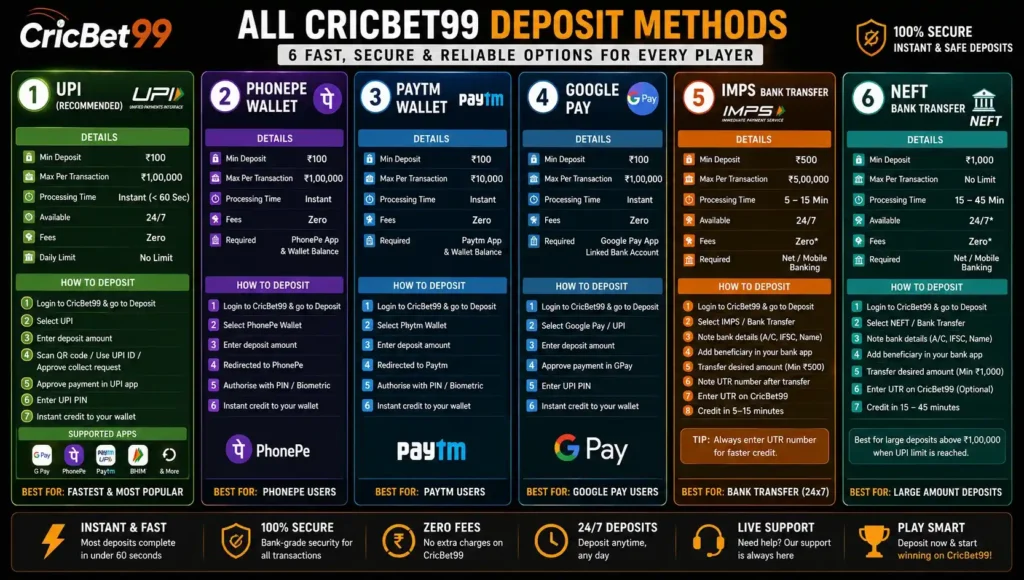
Method 1: UPI (Unified Payments Interface) – Recommended
UPI is the fastest, simplest, and most popular deposit method on CricBet99. It connects directly to your bank account through your existing UPI app and completes in under 60 seconds with no extra steps or card details required.
Compatible UPI apps: Google Pay, PhonePe, Paytm UPI, BHIM, Amazon Pay UPI, Axis Pay, iMobile Pay (ICICI), HDFC PayZapp, Kotak Pay, SBI YONO, and any other UPI-enabled banking application.
UPI deposit details:
| Detail | Information |
|---|---|
| Minimum deposit | Rs 100 |
| Maximum per transaction | Rs 1,00,000 (set by NPCI for all UPI) |
| Processing time | Instant, under 60 seconds |
| Available hours | 24 hours, 7 days a week |
| Fees | Zero |
| Daily transaction limit | No limit on number of transactions |
How to deposit via UPI on CricBet99:
Step 1: Log in to your CricBet99 account and go to the Wallet or Deposit section.
Step 2: Select UPI as your payment method.
Step 3: Enter your deposit amount (minimum Rs 100).
Step 4: CricBet99 will display either a UPI ID to send to, a QR code to scan, or a collect request will appear in your UPI app.
Step 5: Open your UPI app (Google Pay, PhonePe, Paytm, or BHIM), approve the collect request or complete the payment using the displayed UPI ID or QR code.
Step 6: Enter your UPI PIN to authorise the transaction.
Step 7: Your CricBet99 wallet is credited instantly. Refresh your balance to confirm.
Important UPI deposit tip: The UPI ID displayed by CricBet99 changes periodically for security. Always use the ID shown during your current deposit session. Do not save and reuse an old UPI ID from a previous deposit.
Method 2: PhonePe Wallet
PhonePe wallet deposits offer an alternative if your UPI transaction is experiencing a delay or bank server issue. The PhonePe wallet and UPI function independently so if one is slow the other is usually fast.
| Detail | Information |
|---|---|
| Minimum deposit | Rs 100 |
| Maximum per transaction | Rs 1,00,000 |
| Processing time | Instant |
| Fees | Zero |
| Required | PhonePe app installed and wallet funded |
How to deposit via PhonePe Wallet:
Step 1: Log in to CricBet99 and go to Deposit.
Step 2: Select PhonePe Wallet.
Step 3: Enter your deposit amount.
Step 4: You will be redirected to the PhonePe app or a PhonePe payment screen.
Step 5: Authorise the payment using your PhonePe PIN or biometric.
Step 6: Funds are credited to your CricBet99 wallet instantly.
Method 3: Paytm Wallet
Paytm wallet deposits function similarly to PhonePe. If your Paytm wallet has sufficient balance, this is one of the fastest deposit methods on CricBet99.
| Detail | Information |
|---|---|
| Minimum deposit | Rs 100 |
| Maximum per transaction | Rs 10,000 per transaction (Paytm wallet limit) |
| Processing time | Instant |
| Fees | Zero |
| Required | Paytm app with sufficient wallet balance |
Note: Paytm wallet deposits are limited to Rs 10,000 per transaction due to Paytm’s own wallet limits. For larger deposits, use UPI or IMPS.
Method 4: Google Pay
Google Pay functions as a UPI deposit on CricBet99. You can use Google Pay either through the standard UPI flow (selecting UPI as the method) or through the dedicated Google Pay option if available on your CricBet99 deposit page.
| Detail | Information |
|---|---|
| Minimum deposit | Rs 100 |
| Maximum per transaction | Rs 1,00,000 |
| Processing time | Instant |
| Fees | Zero |
| Required | Google Pay app linked to an active bank account |
Method 5: IMPS Bank Transfer
IMPS (Immediate Payment Service) is a direct bank-to-bank transfer that is available 24 hours a day. It is slightly slower than UPI but is the preferred method for users who prefer traditional banking over app-based payments.
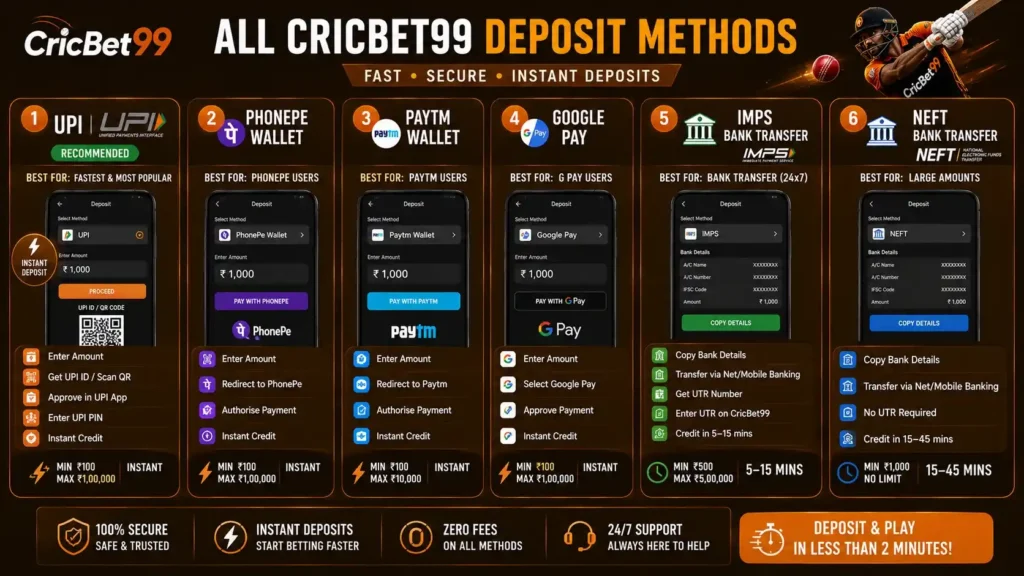
| Detail | Information |
|---|---|
| Minimum deposit | Rs 500 |
| Maximum per transaction | Rs 5,00,000 |
| Processing time | 5 to 15 minutes |
| Available hours | 24 hours, 7 days a week |
| Fees | Zero on CricBet99 side (your bank may charge a small fee) |
| Required | Net banking or mobile banking access |
How to deposit via IMPS on CricBet99:
Step 1: Log in to CricBet99 and go to Deposit. Select IMPS or Bank Transfer.
Step 2: CricBet99 displays bank account details: Account Name, Account Number, IFSC Code, and Bank Name. Note these carefully.
Step 3: Open your bank’s net banking or mobile banking app.
Step 4: Go to Fund Transfer or IMPS Transfer.
Step 5: Add the CricBet99 account as a beneficiary using the displayed account number and IFSC code.
Step 6: Transfer your desired amount (minimum Rs 500).
Step 7: After the transfer is complete, your bank shows a UTR (Unique Transaction Reference) number. Copy or screenshot this number.
Step 8: Return to CricBet99 and enter the UTR number in the confirmation field. This step speeds up crediting significantly. Without the UTR, CricBet99 must manually match the transfer.
Step 9: Your deposit is credited within 5 to 15 minutes.
IMPS deposit critical tip: Always enter your UTR number after an IMPS transfer. This is the single most important step that new users miss. Without the UTR, your deposit may take 30 to 60 minutes instead of 5 to 15 minutes.
Method 6: NEFT Bank Transfer
NEFT (National Electronic Funds Transfer) is a batch-processing bank transfer method. Unlike IMPS which is instant, NEFT processes in hourly batches during banking hours. It is suitable for large deposits where the user is not in a hurry.
| Detail | Information |
|---|---|
| Minimum deposit | Rs 1,000 |
| Maximum per transaction | No official NEFT upper limit |
| Processing time | 15 to 45 minutes during banking hours |
| Available hours | 24 hours (RBI enabled NEFT 24/7 from December 2019) |
| Fees | Zero on CricBet99 side |
NEFT is best used for deposits above Rs 1,00,000 where the UPI per-transaction limit is reached. For standard betting deposits, UPI or IMPS is faster and simpler.
How to Deposit on the CricBet99 App
The deposit process on the CricBet99 Android app is faster than the website because the app can directly trigger your UPI app without redirecting to a browser.
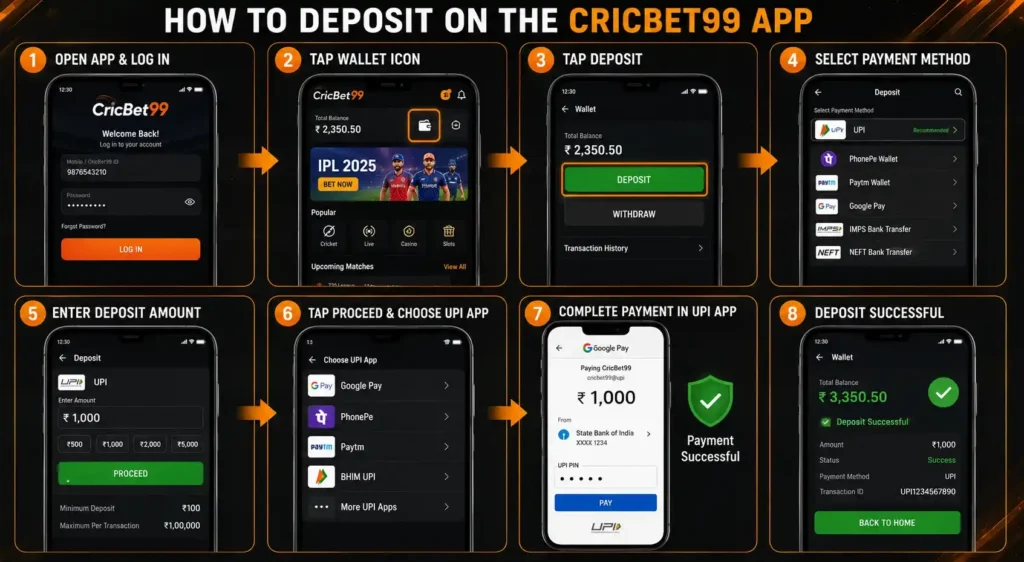
Step 1: Open the CricBet99 app and log in.
Step 2: Tap the Wallet icon in the top navigation bar. It appears as a wallet or cash icon depending on your app version.
Step 3: Tap Deposit.
Step 4: Select your payment method. UPI is listed first and is the recommended option.
Step 5: Enter your deposit amount. The minimum is Rs 100.
Step 6: Tap Proceed. On Android, your installed UPI apps are displayed as options (Google Pay, PhonePe, Paytm). Select your preferred app.
Step 7: Complete the payment in your UPI app. Enter your UPI PIN to confirm.
Step 8: You are returned to the CricBet99 app. Your wallet balance updates immediately.
The entire deposit process on the CricBet99 app takes under 60 seconds for UPI. This is the fastest deposit experience available on the platform.
Your First CricBet99 Deposit – Welcome Bonus of Up to Rs 10,000
Your first deposit on CricBet99 is your most valuable one because it activates the welcome bonus. Here is exactly how it works:
When you complete your first deposit of Rs 500 or more, CricBet99 automatically credits a 100 percent match bonus to your account. Deposit Rs 5,000 and receive Rs 5,000 in bonus funds. Deposit Rs 10,000 and receive the maximum bonus of Rs 10,000. Your total betting balance after the first deposit is doubled automatically.
First deposit bonus conditions:
| Condition | Detail |
|---|---|
| Minimum first deposit to qualify | Rs 500 |
| Maximum bonus | Rs 10,000 |
| Bonus credited | Within 5 minutes of deposit |
| Bonus code required | No – automatic |
| Wagering requirement | 3x rollover before withdrawal |
| Bonus validity | 7 days from credit |
| Eligible markets | All cricket betting, sports, and casino games |
Example: You deposit Rs 3,000 as your first deposit. CricBet99 credits Rs 3,000 in bonus funds within 5 minutes. Your total wallet balance is Rs 6,000 – Rs 3,000 of your own money (fully withdrawable) plus Rs 3,000 in bonus funds (withdrawable after 3x wagering is complete).
See our full Bonus Guide for complete details on the welcome bonus and all ongoing promotions.
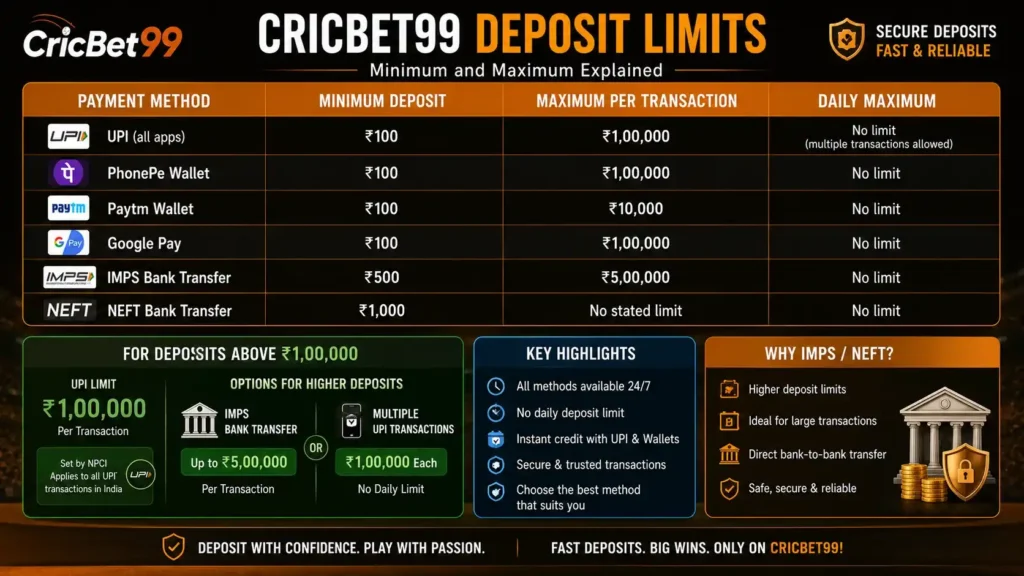
CricBet99 Deposit Limits – Minimum and Maximum Explained
| Payment Method | Minimum Deposit | Maximum per Transaction | Daily Maximum |
|---|---|---|---|
| UPI (all apps) | Rs 100 | Rs 1,00,000 | No limit (multiple transactions allowed) |
| PhonePe Wallet | Rs 100 | Rs 1,00,000 | No limit |
| Paytm Wallet | Rs 100 | Rs 10,000 | No limit |
| Google Pay | Rs 100 | Rs 1,00,000 | No limit |
| IMPS Bank Transfer | Rs 500 | Rs 5,00,000 | No limit |
| NEFT Bank Transfer | Rs 1,000 | No stated limit | No limit |
For deposits above Rs 1,00,000:
The UPI per-transaction limit of Rs 1,00,000 is set by NPCI (National Payments Corporation of India) and applies to all UPI transactions in India regardless of the platform. It is not a CricBet99 restriction. To deposit above Rs 1,00,000 in a single transaction, use IMPS bank transfer which supports up to Rs 5,00,000 per transaction. Alternatively, make multiple UPI transactions of Rs 1,00,000 each.
CricBet99 Deposit Problems – Every Issue and Fix
Problem 1: Deposit Deducted from Bank but Not Credited in CricBet99 Wallet
This is the most common deposit issue and it is almost always resolved without loss of funds.
Why it happens: Your bank processed the payment but the transaction notification between your bank and CricBet99 was delayed. This is common during high-traffic periods such as IPL match days when payment gateway servers experience peak load.
Fix:
- Do not make another deposit
- Wait 15 minutes before taking any action as most delayed deposits self-resolve
- If still not credited after 15 minutes, contact CricBet99 WhatsApp support
- Share your UTR number (for IMPS) or the transaction reference number from your UPI app
- The support team will manually verify and credit your deposit within 30 to 60 minutes
- Keep your bank transaction screenshot until the issue is resolved
Problem 2: UPI Transaction Failed but Money Deducted
Why it happens: The payment was initiated and deducted from your bank account but the confirmation was not received by CricBet99 before the session timed out.
Fix:
- Check your bank account. In most cases the amount is refunded to your bank within 2 to 7 business days automatically by your bank’s failed transaction process
- If the refund does not appear within 7 business days, contact your bank with the UPI transaction reference number
- Simultaneously contact CricBet99 WhatsApp support with the transaction reference
Problem 3: UPI Payment Taking Too Long to Process
Why it happens: Peak banking hours, UPI server congestion (common during IPL matches), or your specific bank’s UPI processing being slow.
Fix:
- Switch from your current UPI app to a different one. If Google Pay is slow, try PhonePe or Paytm
- Try depositing via IMPS bank transfer as an alternative to UPI
- Avoid depositing in the 30 minutes immediately before and after an IPL match when payment gateway traffic peaks
- Wait 5 minutes and retry
Problem 4: Deposit Page Not Loading
Why it happens: Browser cache issue, session timeout, or ISP blocking.
Fix:
- Clear your browser cache and reload the CricBet99 deposit page
- Log out and log back in to refresh your session
- Use the CricBet99 app instead of the browser for deposits as the app is more stable during peak traffic
- Use a different browser or try in Incognito mode
Problem 5: UPI ID Error or Payment Declined by Bank
Why it happens: The UPI ID shown by CricBet99 rotates for security purposes and an old ID may no longer be valid. Alternatively, your bank’s UPI service may be temporarily down.
Fix:
- Always use the UPI ID displayed in your current active deposit session
- Do not use a UPI ID saved from a previous session
- If your bank’s UPI is down, check your bank’s app or website for service status and use IMPS as an alternative
Problem 6: Deposit Credited but Welcome Bonus Not Received
Why it happens: The bonus may take up to 10 minutes to credit after the deposit is processed. Alternatively, the deposit may not have met the minimum qualifying amount of Rs 500.
Fix:
- Wait 10 minutes after your deposit is credited before checking your bonus
- Verify your first deposit was Rs 500 or more
- If more than 30 minutes have passed and the bonus is still not credited, contact WhatsApp support with your deposit confirmation
Is CricBet99 Deposit Safe? Security Explained
Every deposit made on CricBet99 is processed through encrypted, secure payment infrastructure. Here is exactly how your deposit money is protected:
SSL Encryption: All data transmitted during a deposit transaction is protected by 256-bit SSL encryption. Your bank details, UPI PIN confirmation, and transaction references are encrypted end-to-end. CricBet99 cannot see your UPI PIN at any point.
RBI-Regulated UPI Infrastructure: All UPI deposits are processed through NPCI-regulated payment gateways. The same infrastructure used by major Indian banks and e-commerce platforms processes your CricBet99 deposits.
CricBet99 Does Not Store Your Bank Details: CricBet99 does not store your bank account number, UPI handle, or any other payment credentials on its servers. Each deposit session generates a new payment session. Your bank details remain with your bank and UPI provider only.
Verified Payment Gateways: CricBet99 uses verified third-party payment gateway providers for processing. These providers are the same companies that process payments for major Indian e-commerce and fintech platforms.
Your Own Funds Are Always Safe: Your deposited funds are stored in your CricBet99 wallet and are fully withdrawable at any time. Only bonus funds carry wagering requirements before withdrawal. Your own deposited money has no restrictions.
CricBet99 Deposit – Frequently Asked Questions
What is the minimum deposit on CricBet99?
The minimum deposit on CricBet99 is Rs 100 via UPI, PhonePe, Paytm, and Google Pay. For IMPS bank transfers the minimum is Rs 500. For NEFT the minimum is Rs 1,000.
How long does a CricBet99 deposit take?
UPI, PhonePe, Paytm, and Google Pay deposits are credited instantly, typically within 30 to 60 seconds. IMPS bank transfers take 5 to 15 minutes. NEFT takes 15 to 45 minutes. In all cases, entering your UTR number after IMPS transfers speeds up crediting.
Are there any deposit fees on CricBet99?
No. CricBet99 charges zero fees on all deposits regardless of payment method. The full amount you deposit is credited to your CricBet99 wallet.
What UPI apps work for CricBet99 deposits?
All UPI-enabled apps work for CricBet99 deposits including Google Pay, PhonePe, Paytm UPI, BHIM, Amazon Pay UPI, and all bank-specific UPI apps such as iMobile Pay, HDFC PayZapp, and SBI YONO.
Can I deposit on CricBet99 at night?
Yes. CricBet99 accepts deposits 24 hours a day, 7 days a week including weekends and public holidays. UPI and wallet deposits are processed instantly at any hour. IMPS is also available 24/7. NEFT processes in hourly batches but is available continuously.
My deposit was deducted but not credited. What should I do?
Do not make another deposit. Wait 15 minutes as most delayed deposits self-resolve. If still not credited, contact CricBet99 WhatsApp support with your UTR or transaction reference screenshot. Your funds will be manually credited within 30 to 60 minutes.
What is the maximum deposit on CricBet99?
UPI deposits are limited to Rs 1,00,000 per transaction by NPCI rules. IMPS deposits can be up to Rs 5,00,000 per transaction. There is no daily maximum limit on CricBet99. You can make multiple deposits in a day.
Does my first deposit activate the welcome bonus?
Yes. Your first deposit of Rs 500 or more automatically activates the 100 percent welcome bonus of up to Rs 10,000. The bonus is credited to your wallet within 5 minutes. No code is required.
Add Money to Your CricBet99 Account Now
Zero fees, instant UPI credit, and your Rs 10,000 welcome bonus waiting on your first deposit. Log in to CricBet99, go to Wallet, select UPI, and your funds are ready to bet within 60 seconds.
18+ only. Gambling involves financial risk. Please deposit only what you can afford to lose. Play responsibly.