
Cricbet99 Deposit – How to Add Money to Your Account
Adding money to your Cricbet99 account is simple. You can deposit using UPI, bank transfer, wallets or crypto, starting from ₹100, with no maximum deposit limit set by Cricbet99. Once you pay and submit your UTR, your deposit usually reflects in about 15 minutes. You need an active Cricbet99 ID to make a deposit.
Cricbet99 Deposit Methods
| Method | Minimum deposit | Maximum deposit | Typical time to reflect |
|---|---|---|---|
| UPI (Google Pay, PhonePe, Paytm and other UPI apps) | ₹100 | No maximum | About 15 minutes |
| Bank transfer (IMPS / NEFT) | ₹100 | No maximum | About 15 minutes |
| Wallets (PhonePe, Paytm) | ₹100 | No maximum | About 15 minutes |
| Crypto | ₹100 | No maximum | About 15 minutes |
Cricbet99 does not set a maximum deposit limit, but your bank, UPI app or wallet may apply its own daily or per-transaction limits.
UPI
UPI is the most convenient option for most players. You can pay using any UPI app, such as Google Pay, PhonePe or Paytm, by scanning the QR code or using the UPI details shown on the deposit page.
Bank Transfer
You can transfer money from your bank account using IMPS or NEFT to the account details shown on the deposit page. Bank transfers are a good choice for larger deposits.
Wallets
Players who keep a balance in their PhonePe or Paytm wallet can use it to deposit, following the payment details shown on the deposit page.
Crypto
Cricbet99 also accepts crypto deposits. Always use the exact crypto payment details shown in your account, and check the network before sending.
How to Deposit on Cricbet99
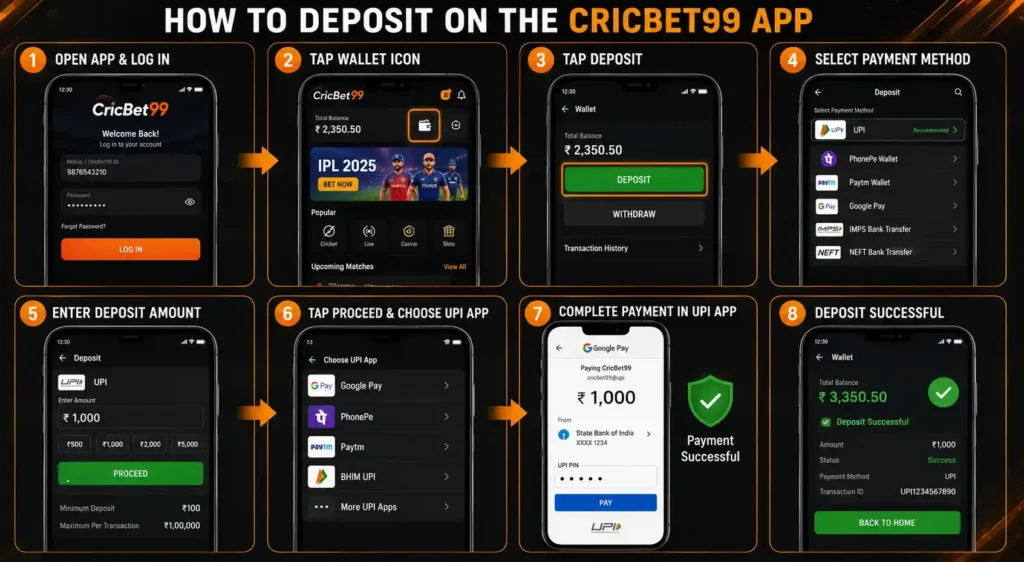
- Log in to your account through Cricbet99 login or the Cricbet99 app.
- Open your wallet and select Deposit.
- Choose your payment method: UPI, bank transfer, wallet or crypto.
- Enter the amount you want to deposit. The minimum is ₹100.
- Complete the payment using the details shown on the deposit page.
- Enter your UTR or transaction reference number and upload a payment screenshot if requested.
- Submit your deposit request. The amount usually reflects in your account in about 15 minutes.
What Is a UTR Number?
A UTR (Unique Transaction Reference) is the reference number your bank or UPI app creates for every payment. Cricbet99 uses it to match your payment to your account, so entering it correctly is important.
- UPI apps: open the payment in your transaction history and look for the UPI reference or UTR number, usually 12 digits.
- Bank transfer: find the reference number in your bank app, SMS confirmation or statement.
- Tip: take a screenshot of the successful payment before you leave the payment app.
Deposit Bonus
During major cricket tournaments such as the IPL, BBL and BPL, eligible deposits can receive a tournament bonus of up to 20%. The bonus is credited automatically and has no wagering requirement. See Cricbet99 bonus for details.
Cricbet99 Deposit Problems and Fixes
Money Deducted but Deposit Not Credited
Check that you submitted the correct UTR. If the amount has not appeared after about 15 minutes, contact support with your username, amount, payment method, date, UTR and a payment screenshot.
UPI Payment Failed but Money Deducted
If your UPI app shows the payment as failed, the amount is usually returned to your account by your bank. Check the transaction status in your UPI app and contact your bank if the refund does not arrive.
Wrong UTR Entered
If you entered an incorrect UTR, contact our support team with the correct reference number and a payment screenshot so the deposit can be matched to your account.
Deposit Page Not Loading
Check your internet connection, refresh the page or try the Cricbet99 app or another browser. If the problem continues, contact our support team.
Deposit Safely
- Only pay using the payment details shown inside your Cricbet99 account or shared by our official support team.
- Never send money to numbers or accounts shared by unknown people on social media.
- Never share your UPI PIN, OTP or password with anyone.
- Keep your UTR and payment screenshot until the deposit appears in your account.
Ready to cash out your winnings? See Cricbet99 withdrawal. For help with a deposit, visit Cricbet99 contact.
Cricbet99 Deposit FAQs
What is the minimum deposit on Cricbet99?
The minimum deposit on Cricbet99 is ₹100 for every payment method.
Is there a maximum deposit limit on Cricbet99?
No. Cricbet99 does not set a maximum deposit limit. Your bank, UPI app or wallet may apply its own transaction limits.
How long does a Cricbet99 deposit take?
After you submit your UTR or transaction reference, a Cricbet99 deposit usually reflects in your account in about 15 minutes.
What is a UTR number and where do I find it?
A UTR (Unique Transaction Reference) is the reference number for your payment. For UPI payments, it is usually a 12-digit number shown in the transaction details of your UPI app. For bank transfers, it appears in your bank app or statement.
What should I do if my deposit is not credited?
First check that you entered the correct UTR. If the deposit has not appeared after about 15 minutes, contact Cricbet99 support with your username, amount, payment method, date and UTR, plus a payment screenshot if available.
Cricbet99 is intended for users aged 18 and over. Only deposit what you can afford to lose, and visit Cricbet99 responsible gaming for guidance.