

CricBet99 Deposit and Withdrawal Tips – Get Funds In and Out Faster
You have a CricBet99 account, a match you want to bet on, and your winnings ready to withdraw. The only thing standing between you and a smooth experience is knowing the platform’s payment system well enough to avoid the delays that catch most new users.
This guide covers everything experienced CricBet99 users know about deposits and withdrawals that first-time players typically discover only after a frustrating stuck transaction. After reading this, you will deposit instantly every time, never leave your UTR number in the wrong place, complete KYC before it slows your first withdrawal, and withdraw to UPI in under 10 minutes consistently.
Table of Contents
Deposit Tips – How to Get Your Money Credited Instantly Every Time
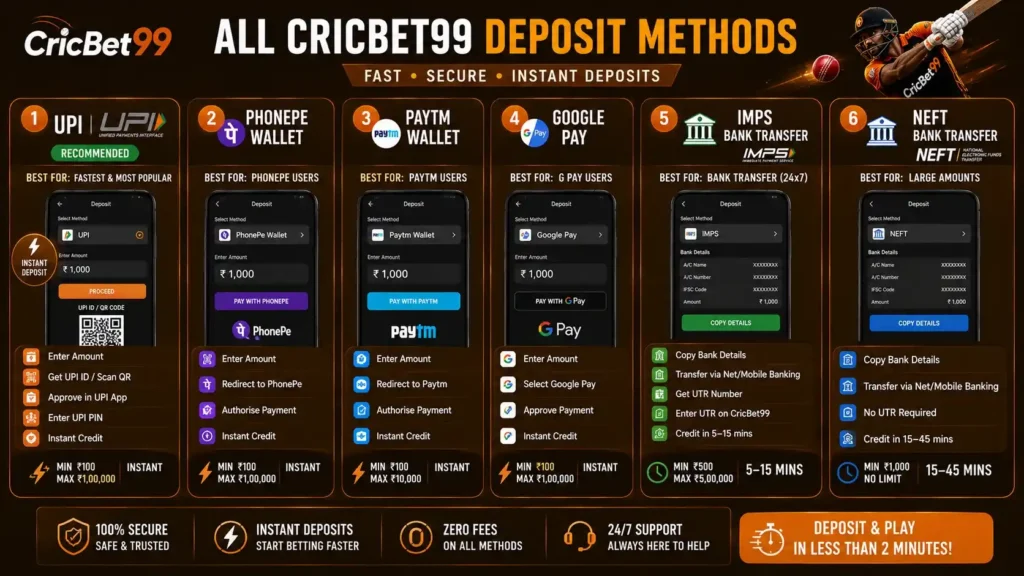
Tip 1: Always Use UPI for Deposits – It is Genuinely Instant
UPI (Unified Payments Interface) is the fastest deposit method on CricBet99 and is not even close to the next fastest option. UPI deposits are credited within 30 to 60 seconds. IMPS takes 5 to 15 minutes. NEFT takes 15 to 45 minutes.
Unless you need to deposit more than Rs 1,00,000 in a single transaction (the NPCI-set UPI per-transaction limit), use UPI for every deposit. The speed difference during a live IPL match where you want to bet on a live market can be the difference between getting your stake on before an odds change and missing the opportunity entirely.
Best UPI apps for CricBet99 deposits (ranked by speed in our testing):
- Google Pay (consistently fastest processing)
- PhonePe (very close second)
- Paytm UPI (slightly slower but reliable)
- BHIM (reliable for large UPI amounts)
Tip 2: Never Save and Reuse an Old CricBet99 UPI ID
CricBet99 rotates the UPI IDs displayed on the deposit page periodically as a security measure. The UPI ID shown during your current deposit session is always the correct and active one. A UPI ID from a previous session may still be technically active or may no longer work.
Never save a CricBet99 UPI ID and reuse it for future deposits. Always open a fresh deposit session each time and use the UPI ID displayed in that session. This is the single most common deposit error that results in funds going somewhere unexpected.
Tip 3: Submit Your UTR Number After Every IMPS Deposit
When you deposit via IMPS bank transfer on CricBet99, you will see a field asking for your UTR (Unique Transaction Reference) number after the transfer. This step is optional from the platform’s perspective but is critical for your deposit speed.
The UTR number is the 12-digit or 16-digit reference generated by your bank for the IMPS transfer. You find it in your mobile banking app transaction history immediately after the transfer completes.
When you enter the UTR on CricBet99, the support team can manually match and credit your deposit within 5 to 10 minutes. Without the UTR, the team must wait for the automatic reconciliation process which can take 30 to 60 minutes during peak periods.
Where to find your UTR number: HDFC: Mobile banking > Transaction History > Select the transfer > Reference Number SBI: Yono app > Transaction History > UTR Reference ICICI: iMobile > Payments > Transaction History > Transfer Reference Axis: Axis Mobile > Transaction History > IMPS Reference Number
Screenshot your UTR number immediately after every IMPS transfer as a backup.
Tip 4: Avoid Depositing in the 30 Minutes Before IPL Matches Start
Payment gateway servers experience peak load in the 30 minutes immediately before a major IPL match as millions of bettors top up their accounts simultaneously. UPI transaction approvals that take 20 seconds normally can take 3 to 5 minutes during this window.
If you know you want to bet on an IPL match, deposit at least 45 to 60 minutes before the match starts. Your funds are available well before the match begins and you avoid the pre-match rush.
Tip 5: Use Multiple Small UPI Transactions for Large Deposits
The NPCI UPI per-transaction limit is Rs 1,00,000. Individual banks sometimes have lower per-transaction limits (some set Rs 50,000 or Rs 25,000 per transaction). If you need to deposit a large amount, split it into multiple transactions rather than fighting bank limits.
Example: To deposit Rs 2,00,000 via UPI, make two separate transactions of Rs 1,00,000 each or four transactions of Rs 50,000 each. Each transaction completes instantly and your wallet updates after each one.
Tip 6: Keep Your Deposit Method Consistent with Your Withdrawal Method
CricBet99’s KYC and fraud monitoring system flags accounts where deposits come from one payment method and withdrawals go to a completely different, unrelated account. While this is not a hard rule, consistent use of the same payment ecosystem (for example always using Google Pay linked to your HDFC account for both deposit and withdrawal) reduces the likelihood of a verification flag on your first withdrawal.
Withdrawal Tips – Get Your Winnings in Under 10 Minutes

Tip 7: Use UPI for Withdrawals – Always
Just as with deposits, UPI is the fastest withdrawal method on CricBet99. Our tested average for UPI withdrawal from submission to bank account credit is 8 to 15 minutes. IMPS takes 10 to 60 minutes. Paytm wallet takes 10 to 25 minutes and still requires an additional transfer from Paytm to your bank.
For every routine withdrawal of Rs 2,00,000 or less, use UPI. Save IMPS for large withdrawals above the UPI practical limit.
Tip 8: Complete KYC Proactively Before Your First Withdrawal
CricBet99 requires basic KYC (Know Your Customer) identity verification for first-time withdrawals above Rs 10,000. This is a one-time process. If you trigger KYC during a withdrawal attempt, the verification takes 15 to 60 minutes and delays your withdrawal.
The smart approach: contact CricBet99 WhatsApp support proactively within your first 24 to 48 hours of registration and submit your PAN card photo before you make any withdrawal request. The team processes it during a low-traffic period and your account is pre-verified. All future withdrawals process without KYC delays.
Documents to prepare for CricBet99 KYC:
- PAN card (front photo, all details clearly visible)
- Make sure the name on your PAN matches your CricBet99 registered name exactly
- File size: under 2MB
- Format: JPG, PNG, or PDF
Common KYC rejection causes: blurry photo, name mismatch between PAN and CricBet99 account, card partially cut off in frame. Avoid all three by taking a clear, full photo of the card on a flat surface with good lighting.
Tip 9: Double Check Your UPI ID Before Confirming Every Withdrawal
Withdrawals to an incorrect UPI ID are genuinely difficult to reverse. Unlike a failed bank transfer that is automatically refunded, funds sent to an incorrect but valid UPI ID belong to the recipient of that ID. Recovery depends entirely on that person’s willingness to return the funds.
Always verify your UPI ID character by character before confirming a withdrawal. The safest method: copy your UPI ID directly from your PhonePe, Google Pay, or Paytm app rather than typing it manually.
How to find your UPI ID in each app: Google Pay: Profile icon > My QR / Payment Address PhonePe: Profile > UPI IDs Paytm: Profile > My Paytm > UPI ID
Tip 10: Withdraw Before, Not During, IPL Match Peak Hours
CricBet99 processes withdrawals continuously but the processing queue is longest in the period from 6 PM to 10 PM on IPL match evenings when thousands of users submit withdrawal requests simultaneously after settling bets.
For the fastest withdrawal processing, submit requests in the morning (9 AM to 12 PM) or after midnight. The average processing time during these off-peak periods is 5 to 10 minutes for UPI versus 15 to 28 minutes during peak evening match hours.
If your winning bet settles during an IPL match evening, you can withdraw immediately, but expect slightly longer than usual processing. Your funds are safe and queued; patience for 20 to 30 minutes during peak hours is normal.
Tip 11: Keep Your Wallet Active – Do Not Withdraw Your Entire Balance
Experienced CricBet99 users recommend keeping at least Rs 100 to Rs 200 in your CricBet99 wallet at all times rather than withdrawing your complete balance after every session. A completely empty wallet requires a fresh deposit before each betting session. Keeping a small amount in the wallet means you can immediately place a bet when an opportunity arises without waiting for a deposit to process.
Tip 12: Understand Which Part of Your Balance is Withdrawable
CricBet99 maintains two balance categories in your wallet:
Main balance (fully withdrawable at any time): Your deposited funds and confirmed winnings from settled bets.
Bonus balance (withdrawable after wagering requirement is met): Bonus credits from the welcome offer, reload bonuses, and cashback. These require 3x wagering before withdrawal for most bonuses.
When you check your balance and plan a withdrawal, note that only your main balance is immediately withdrawable. If your main balance shows Rs 2,000 and your bonus balance shows Rs 1,000, you can withdraw up to Rs 2,000 today. The Rs 1,000 bonus becomes withdrawable after the relevant wagering is completed.
What to Do When Things Go Wrong
Deposit Stuck for More Than 15 Minutes
- Do not make another deposit
- Check your bank account to confirm the deduction occurred
- If deducted: contact CricBet99 WhatsApp support with your UTR number and a screenshot of the transaction
- If not deducted: the transaction failed. Retry with a fresh deposit session.
Withdrawal Pending for More Than 60 Minutes
- Check that your bonus wagering requirement is complete (main cause of withdrawal holds)
- Check that the payment details you entered are correct
- Contact CricBet99 WhatsApp support with your withdrawal reference number, registered mobile number, and amount
- The support team traces the payment in real time and provides a status update within minutes
KYC Verification Taking Too Long
KYC verification typically completes within 15 to 60 minutes during standard hours. If verification has been pending for more than 2 hours, contact WhatsApp support with your reference and ask for an escalation to the verification team.
The Ideal CricBet99 Payment Routine for Active Bettors
Here is the deposit and withdrawal routine used by experienced CricBet99 users who have optimised their payment experience:
Setup (first week): Complete KYC proactively by sending your PAN card to WhatsApp support. Set your UPI ID as your primary withdrawal method. Verify your UPI ID works by making one small deposit and one small withdrawal in the same session.
Before each IPL match: Deposit at least 45 minutes before match time via Google Pay or PhonePe. Keep a buffer of Rs 200 in your wallet from the previous session to ensure immediate access.
After each session: Withdraw your main balance minus Rs 200 buffer within 30 minutes of your last bet settling. Morning or late night withdrawals process fastest.
Monthly: Review your deposit and withdrawal history for any patterns (failed UPI times, processing delays) and adjust your timing accordingly.
Frequently Asked Questions
How do I make a CricBet99 deposit never get stuck?
Use UPI and always use the UPI ID displayed in your current active session. For IMPS deposits, always submit your UTR number immediately after the transfer. Deposit at least 45 minutes before major IPL matches to avoid peak gateway congestion.
How can I get my CricBet99 withdrawal faster?
Use UPI as your withdrawal method. Submit the request in the morning (9 AM to 12 PM) or after midnight when the processing queue is shortest. Ensure your KYC is pre-completed. Keep your payment details consistent with what you used to deposit.
What is the UTR number for CricBet99 deposits?
The UTR (Unique Transaction Reference) is a 12 to 16 digit number generated by your bank for every IMPS transfer. Find it in your mobile banking app transaction history immediately after the transfer. Enter it in the CricBet99 deposit confirmation field to speed up crediting from 30 to 60 minutes down to 5 to 10 minutes.
Why does my CricBet99 withdrawal show a lower amount than my balance?
Your balance includes both your main balance (withdrawable) and your bonus balance (requires wagering before withdrawal). Only your main balance is available to withdraw immediately. Check the balance breakdown in your CricBet99 wallet section.
Full deposit guide: CricBet99 Deposit | Full withdrawal guide: CricBet99 Withdrawal
18+ only. Please play responsibly. Gambling involves financial risk.

Arjun Mehta is a cricket betting analyst with 8 years of experience covering IPL, T20 betting markets and online gaming platforms across India. 7 years in Indian online betting. Delhi-based cricket fan since 2007. 40+ platform guides published on CricBet99.